




Know your AI spend.
From any device.
Widgets, billing charts, usage trends, session transcripts — across Claude, Codex, Gemini, Cursor and 10+ more platforms.
macOS 14+ · iOS 17+ · watchOS 10+


Apple Watch
Always on your wrist.
Complications, widget stack, native app — see your AI quota, spend and usage straight from your Apple Watch.


Trusted by developers using
Claude Codex Cursor Warp  Droid Gemini
  Antigravity
  Copilot
  OpenRouter
  Windsurf
  Perplexity
  Raycast
 and 40+ more platforms supported
Features
Everything you need to
manage your AI spend
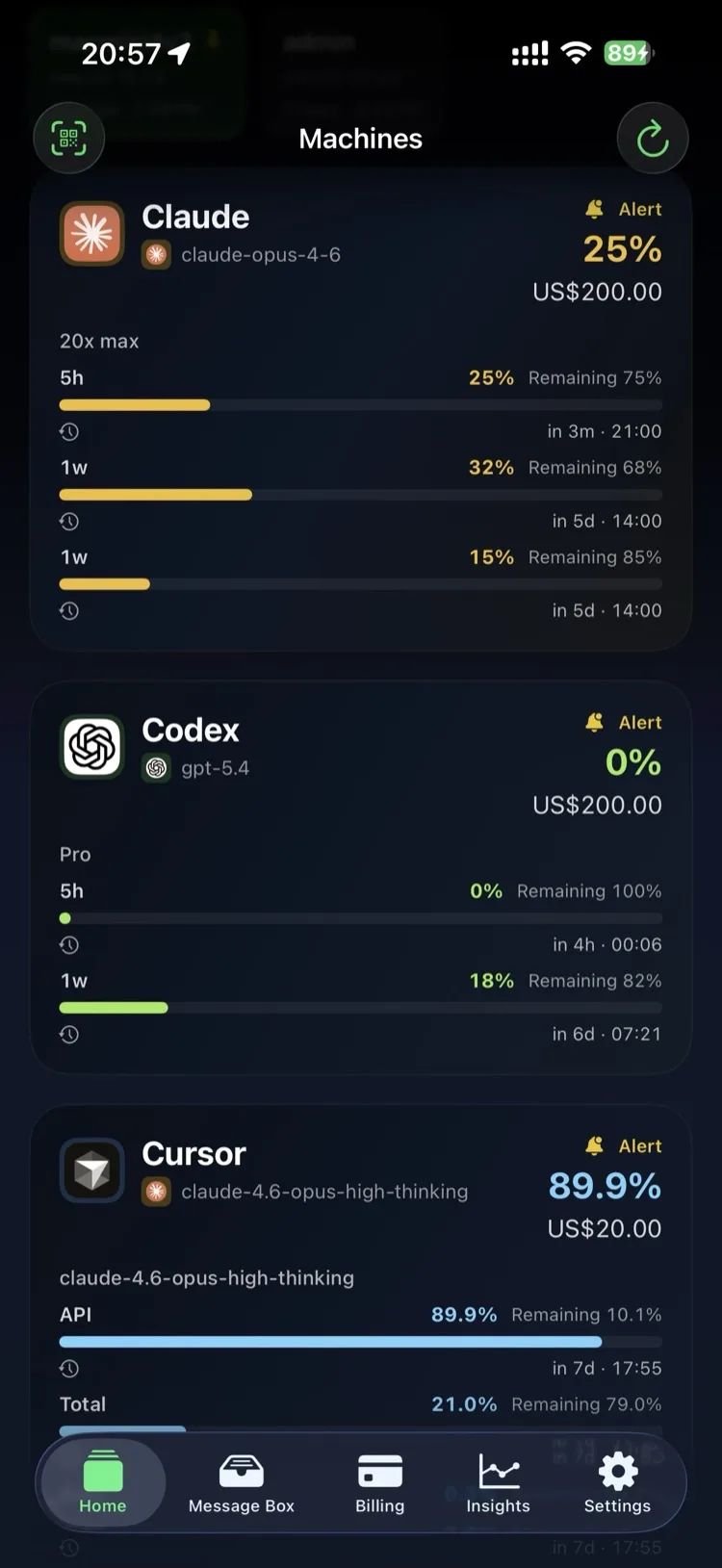
LimitWatch connects to your Mac, reads quota data from your AI tools, and syncs it to your iPhone via iCloud. No servers, no accounts — just your Apple ID.
Widgets everywhere.
Six layouts for your home screen, lock screen, and watch face. Rings, bars, paged lists — configurable per platform count and metric display.
Claude
Usage
Widgets Everywhere
Home screen, lock screen, Apple Watch complications. Six widget layouts — rings, bars, paged lists — always showing your quota at a glance.
Billing Analytics
See monthly equivalents, year-to-date totals, and per-platform cost breakdowns. Multi-currency support (USD/CNY). Know exactly where your AI budget goes.
Usage Trends
Daily token consumption, model-level breakdowns, project-level heatmaps. Spot patterns in your AI usage over days, weeks, and months.
Session Preview
Browse AI conversation transcripts with Markdown rendering. Filter by message type, search across sessions, and export when you need to.
Mac Agent Bridge
Local Unix socket that hooks into Claude, Codex, Gemini, Cursor and more. Live session tracking, permission approvals, and one-tap terminal jump — all running on your Mac (Pro).
Open REST API
12 endpoints on localhost for automation. Query quotas, sessions, approvals, and billing data from scripts, Raycast, or any external tool (Pro).
Capabilities
Not just a dashboard.
Real-time sync, push notifications, live activities, an open API, and a Mac-side agent bridge — LimitWatch is a full monitoring stack for your AI tools.
Usage snapshot
Recent sessions, spend, and token activity

Efficiency overview
Cache share, saved tokens, and effective cost
Push Notifications
Quota resets, approval requests, and task completions — delivered to your iPhone and Apple Watch instantly via iCloud.
Dynamic Island & Live Activities
See live quota status right in your iPhone's Dynamic Island. Tap to expand for details, tap again to jump into the app.
6 Widget Layouts
Ring focus, ring strip, paged list, minimal list, logo list, and overview. Home screen, lock screen, StandBy, and Apple Watch.
Agent Bridge
Hook into Claude, Codex, Gemini, Cursor, Copilot and more via a local Unix socket. Live session tracking, approval requests, and terminal jump — all running on your Mac.
Local REST API
12 HTTP endpoints on localhost for automation. Query quotas, sessions, approvals, billing, and push from scripts, Raycast, or any external tool.
Webhooks & Discord Bot
Forward quota events to Discord, Bark, Telegram, or any generic webhook endpoint. Built-in Discord gateway daemon for two-way approval flows.
How It Works
Mac collects. iPhone unlocks. Everything syncs.
Install the free Mac app
Download LimitWatch for Mac — it is free forever as a quota viewer. It detects your AI tools and reads quota data locally.
Subscribe on iOS to unlock
Get LimitWatch on iPhone and subscribe to Lite or Pro. Your entitlement syncs to every Mac via iCloud. After reinstalling or switching devices, use Restore Purchases in Settings.
Full power on every device
iPhone widgets, Live Activities, and alerts. Mac Agent Bridge, Local API, Dynamic Island, and webhooks — all from a single subscription, with Restore Purchases available in Settings.
Pricing
One subscription. Every device.
Mac app is free to download and keeps working forever as a quota viewer. Buy Lite or Pro on iPhone to unlock the full experience on both iPhone and Mac. If you reinstall or switch devices, restore the purchase from Settings.
Mac is free to download. Buy Lite or Pro on iPhone, then restore from Settings if you reinstall or switch devices.
Early Bird pricing — lock in before prices go up
Free
The quota viewer. View-only, zero background services.
- View quotas for every provider
- Mac menubar pill & popover
- Provider & billing configuration
- Message inbox (read-only)
- Session catalog browsing
- iCloud sync across your devices
Download the Mac app now. Buy Lite on iPhone when you want the mobile plan.
Lite
Early BirdNotifications, widgets, and the full mobile experience.
- Everything in Free
- iPhone home/lock screen widgets
- Apple Watch complications
- Live Activities & Dynamic Island
- Quota alerts (iPhone + Mac)
- Usage trends & analytics
- Advanced billing tools
- Session transcript reading (Mac)
Buy on iPhone. Restore from Settings after reinstalling or switching devices.
Pro
Early BirdUnlocks every Mac-side heavy service — the full power of LimitWatch.
- Everything in Lite
- Mac Agent Bridge — hook Claude, Codex, Gemini, Cursor & more
- Mac Dynamic Island overlay
- Mac Local REST API (12 endpoints)
- Webhooks — Discord, Bark, Telegram, Generic
- Session archive, enhanced parser & export
- Unlimited Mac sources
- Cross-account approval pairing
- Priority support
Buy on iPhone. Restore from Settings after reinstalling or switching devices.
Prefer a one-time purchase?
Lite Lifetime
1 source, full mobile
Early Bird
Pro Lifetime
Everything, forever
Early Bird
Or… build it yourself?
Tempted to vibe-code your own version?
Let's do the math before you start that "weekend project" 👇
- Apple Developer Program $99 / yr
- Claude Max 20x × 3 months (to actually ship) $600
- Domain + object storage (R2) $72 / yr
- Learning CloudKit, StoreKit 2, WidgetKit, Live Activities ~100 hrs
- Integrating 10+ AI provider quota APIs ~80 hrs
- All-nighter coffees × 47 $235
- Fighting Swift 6 concurrency errors Priceless
- Weekends sacrificed for 3 months Priceless
…plus ~180 hours of your life
- 30 seconds to download
- 0 hours of CloudKit debugging
- 0 Swift 6 concurrency errors
- 0 weekends sacrificed
- Battle-tested by thousands of users
- Lifetime updates included
One-time. Forever.
And if LimitWatch helps you cut just one month of your $20 AI subscription, Pro Lifetime pays for itself — with $5 left over.
FAQ
Frequently asked questions
Which AI platforms does LimitWatch support?
LimitWatch works with Claude, Codex, Gemini, Cursor, OpenRouter, Copilot, and many more. The Mac app automatically detects supported tools and reads quota data locally.
Do I need both the Mac and iOS apps?
The Mac app is the data source — it reads quota information from your locally installed AI tools. The iOS app (and Apple Watch) displays that data via iCloud sync. You need the Mac app running on at least one machine.
Does my data leave my machine?
Quota snapshots sync between your own devices through your personal iCloud account. No data is sent to our servers. We use Sentry for anonymous crash reporting only, which you can disable.
How does sync work?
LimitWatch uses iCloud CloudKit and Key-Value Store. If your Mac and iPhone share the same Apple ID, sync is automatic — no accounts to create, no pairing codes needed. For different Apple IDs, QR-code pairing is available (Pro feature).
What widgets are available?
Six layouts: overview, paged list, minimal list, logo list, ring strip, and ring focus. Available on the iPhone home screen, lock screen, and Apple Watch complications. Configurable platform count and display metrics.
What is the difference between Lite and Pro?
Lite unlocks notifications, Live Activities, iPhone widgets with full numeric values, trend charts, billing analytics, and Mac-side session transcript reading. Pro additionally unlocks every Mac heavy service: Agent Bridge (hooks into Claude/Codex/Gemini/Cursor), the Local REST API, Dynamic Island overlay, webhooks (Discord/Bark/Telegram/Generic), session archive with enhanced parser & export, cross-account approval pairing, and unlimited Mac sources.
I subscribed on iOS. How do I unlock Pro on my Mac?
Automatically. There is no Mac paywall and no manual pairing step — buy on iOS and the subscription syncs to all your Macs via iCloud. As soon as both devices are signed into the same Apple ID, the Mac reads your entitlement from iCloud and enables every Pro feature (Agent Bridge, Local API, Dynamic Island, webhooks, etc.). If you reinstall or change devices, tap Restore Purchases in Settings. For a cross-account setup, Pro includes QR-code pairing.
Why is there no Buy button inside the Mac app?
LimitWatch is sold exclusively through the App Store on iOS. The Mac app is a free quota viewer out of the box, and becomes the full product once iOS unlocks it via iCloud sync. This keeps billing in one place, lets a single subscription cover all your devices, and gives you a Restore Purchases action in Settings after a reinstall or device change.
Can I get a refund?
App Store subscriptions can be refunded through Apple. Go to reportaproblem.apple.com within 14 days of purchase.
Is the Mac app sandboxed?
No. The Mac app needs to read configuration files from AI tools (which live outside the sandbox), listen on a local Unix socket for the Agent Bridge, and optionally control terminal apps for session jumping. This is why it is distributed as a direct download rather than through the Mac App Store.